...

How to Calculate Projected Area in Injection Molding?

• ZetarMold Engineering Guide
• Plastic Injection Mold Manufacturing Since 2005
• Built by ZetarMold engineers for buyers comparing mold and molding solutions.

Calculating the projected area1 is one of the first and most critical steps in any 射出成形2 project. Get it wrong, and you risk フラッシュ3 defect, machine damage, or an inability to fill the mold. Get it right, and you can confidently select the right press, estimate clamping force, and produce quality parts from day one.

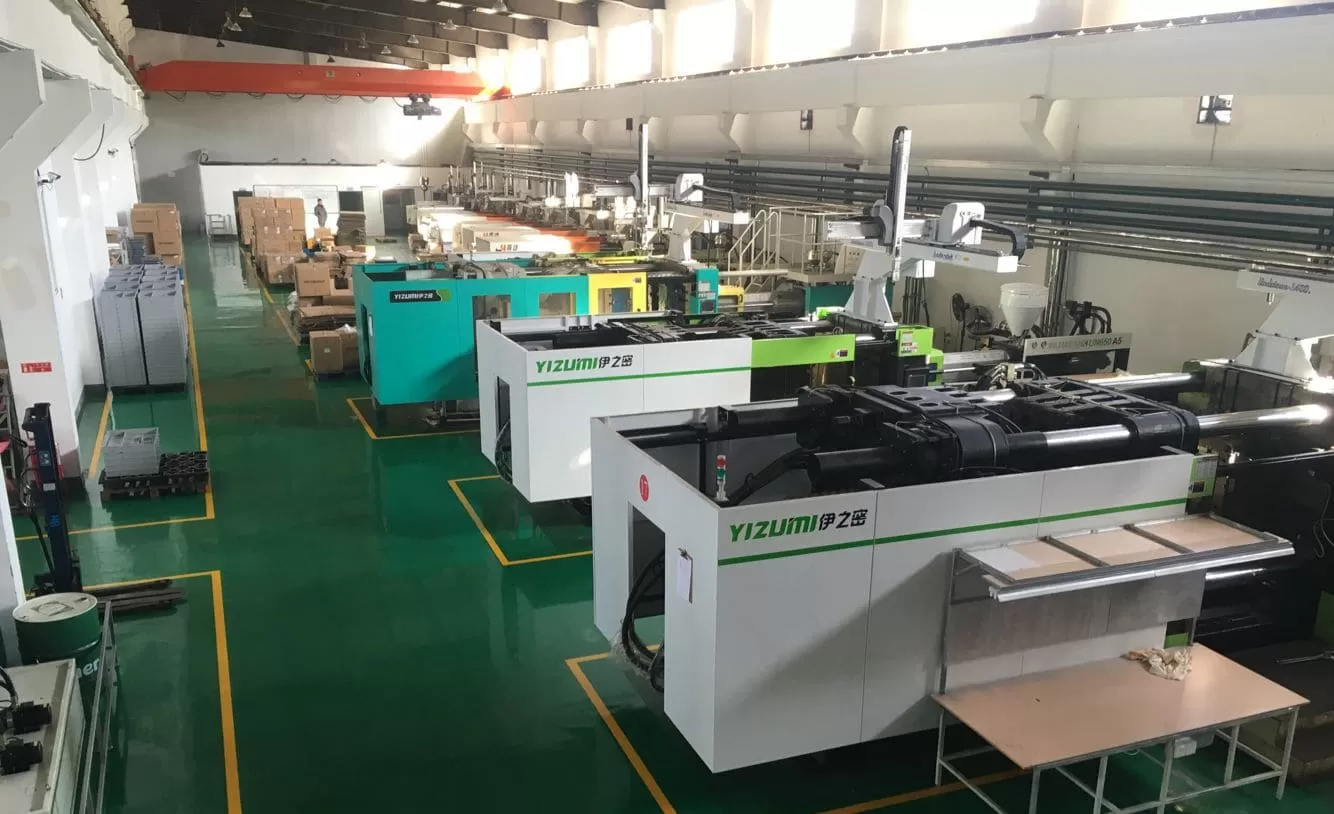
In our Shanghai factory, we run 47 injection molding machines ranging from 90T to 1850T. Every single project starts with the same question: what is the projected area, and does our equipment have enough clamping force? This guide walks you through the calculation process with real formulas, worked examples, and practical tips from two decades of production experience.

要点
  • {‘icon’: ‘check’, ‘text’: ‘Projected area is the 2D silhouette of your part along the clamp direction’}
  • {‘icon’: ‘check’, ‘text’: ‘Clamping Force = Projected Area × Cavity Pressure × Safety Factor’}
  • {‘icon’: ‘check’, ‘text’: ‘Always include runner and gate areas in your calculation’}
  • {‘icon’: ‘check’, ‘text’: ‘Complex shapes can be broken into simpler geometric forms’}
  • {‘icon’: ‘check’, ‘text’: ‘A 10-20% safety margin prevents flash and short shots’}

What Is Projected Area in Injection Molding?

The projected area in injection molding is the two-dimensional shadow or silhouette of your part when viewed from the direction the mold closes. Think of holding a flashlight directly above an object — the shadow it casts on the table is its projected area. This measurement, typically expressed in square centimeters (cm²) or square inches (in), directly determines how much clamping force your machine needs to keep the mold sealed during injection.

より広い視点では、当社の injection molding complete guide プロセスの基礎、材料挙動、生産判断について説明します。

If you are comparing vendors or planning procurement, our injection molding supplier sourcing guide covers RFQ prep, qualification, and commercial risk checks.

Why does it matter so much? When molten plastic enters the mold cavity under high pressure, it generates an outward force proportional to the projected area. If the machine’s clamping force is less than this outward force, the mold will open slightly at the parting line, causing flash — thin, unwanted fins of plastic along the edges of your part. In production environments, flash means rework, scrap, or rejected parts.

🏭 ZetarMold Factory Insight
In our Shanghai factory, we run 47 injection molding machines from 90T to 1850T. Every new project begins by calculating the projected area to ensure we select a press with adequate clamping capacity — this single calculation prevents costly trial-and-error on the production floor.

How Do You Calculate the Projected Area Step by Step?

Projected area is calculated by decomposing the part into basic geometric shapes, measuring each silhouette, and summing the results. Here is our step-by-step method.

Step 1: Determine the Clamping Direction

Before measuring anything, identify which direction the mold opens and closes. This is usually perpendicular to the parting line. The projected area is measured along this axis. For most standard parts, this is the direction the platens move.

Step 2: Break the Part into Simple Geometric Shapes

Look at the part from the clamping direction. Break its outline into basic shapes — rectangles, circles, triangles, and trapezoids. Each shape has a known area formula:

Here are the basic formulas you will need: Rectangle = Length x Width (e.g., 50 mm x 30 mm = 1,500 sq mm); Circle = pi x radius squared (e.g., pi x 20 squared = 1,257 sq mm); Triangle = 0.5 x Base x Height (e.g., 0.5 x 40 x 25 = 500 sq mm); Trapezoid = 0.5 x (a + b) x h (e.g., 0.5 x (30 + 50) x 20 = 800 sq mm).

Step 3: Calculate Each Shape and Sum Them

Apply the appropriate formula to each sub-shape, then add all areas together. For a part that looks like a rectangle with a semicircular tab, you would calculate the rectangular area, the semicircular area, and add them.

Step 4: Add Runner and Gate Areas

Do not forget the runner system. The molten plastic travels through runners and gates before entering the cavity. These channels also generate outward force on the mold. Include the runner projected area in your total. In multi-cavity molds, multiply the single-cavity area by the number of cavities, then add the full runner area.

Step 5: Apply Draft Angle Correction (If Needed)

For parts with significant draft angles, the projected area may differ from the flat-area measurement. Most draft angles (1-3 degrees) have negligible impact, but for deep-draw parts with 5+ degrees of draft, recalculate the silhouette accounting for the angled walls. In practice, this correction rarely exceeds 2-3% of the total area.

What Is the Formula for Clamping Force From Projected Area?

Once you have the projected area, the clamping force formula is the key to selecting the right machine. The fundamental equation is:

Clamping Force (kgf) = Projected Area (cm²) × Cavity Pressure (kgf/cm²)

Converting to tons (where 1 ton = 1,000 kgf):

Tonnage = [Projected Area (cm²) × Cavity Pressure (kgf/cm²)] ÷ 1,000

The cavity pressure depends on the material being molded. Here are typical cavity pressure values for common materials:

素材 Cavity Pressure (kgf/cm2) Cavity Pressure (tons/sq in)
PS(ポリスチレン) 150–250 1.0–1.7
PE(ポリエチレン) 200–300 1.4–2.1
PP(ポリプロピレン) 200–350 1.4–2.5
ABS 300–500 2.1–3.5
PA(ナイロン) 350–600 2.5–4.2
PC(ポリカーボネート) 400–700 2.8–4.9
POM (Acetal) 350–550 2.5–3.9
PBT 350–550 2.5–3.9

計算されたトン数には常に1.1から1.2の安全係数を適用してください。これは粘度変動、金型温度変化、およびプロセス調整に対応します。私たちの実践では、通常15%の安全マージンを使用します。

How to Calculate Projected Area for Common Part Shapes?

一般的な形状は標準的な幾何学を使用します:矩形は長さ×幅、円はπ×半径²、複雑な部品は分解します。

例1:平面矩形部品

120mm×80mmの平らなカバープレートです。金型は薄肉方向(厚さ方向)でクランプされるため、投影面積は単に表面積となります:

投影面積 = 120 mm × 80 mm = 9,600 mm² = 96 cm²

ABSで成形する場合(キャビティ圧力 ≈ 400 kgf/cm²)、必要なトンネージは:トンネージ = (96 cm² × 400 kgf/cm²) ÷ 1,000 = 38.4 トン。安全率1.15を考慮:38.4 × 1.15 = 44.2 トン。50トンプレス機で余裕を持って対応可能です。

例2:円筒部品

外径60mmの円筒ブッシュです。投影面積は円形となります:

投影面積 = π × r² = 3.14159 × 30² = 2,827 mm² = 28.3 cm²

注意:シリンダーが中空の場合、投影面積から内径を差し引いてはいけません。クランプ力は壁の断面積だけでなく、完全な円形シルエット全体に作用します。

例3:L字ブラケット

L型ブラケットは2つの長方形に分割できます:長方形A(60 × 40 mm)と長方形B(40 × 30 mm)。2つの長方形が40 × 30 mmで重なる場合、合計面積は:

投影面積 = (60 × 40) + (40 × 30) – (40 × 30) = 2,400 mm² = 24 cm²

重要な原則:複雑な形状については、単純な形状に分解し、各面積を計算し、重複領域を減算しながら合計します。

What Factors Affect the Projected Area Calculation?

投影面積の精度は4つの要素によって決定されます:部品形状、キャビティ数、ラナー設計、およびスライドやリフターなどの金型機能。

部品形状の複雑さ

リブ、突起、アンダーカット、および変化する肉厚を持つ複雑な部品は、単純な矩形や円ではない投影形状を作ります。CADソフトウェアを使用して3Dモデルから正確な投影面積を抽出してください。最新のCADパッケージ(SolidWorks、Creo、NX)は任意の軸方向の投影面積を自動計算できます。

キャビティ数

多キャビティ金型では、総投影面積は単一キャビティの投影面積をキャビティ数で乗算し、ラナーシステムの面積を加算します。単一キャビティ面積50 cm²、ラナー面積20 cm²の4キャビティ金型の総投影面積は(4 × 50)+ 20 = 220 cm²です。

ランナーシステム設計

コールドランナーは投影面積を大幅に増加させます。直径8mmの完全円形ランナーが金型内で150mm走行する場合、投影面積に12cm²を追加します。ホットランナーシステムは高価ですが、コールドランナーチャネルを排除することで投影面積を削減でき、場合によってはより小型で低コストのプレス機の使用を可能にします。

金設計の特徴

スライド、リフター、コアプルは有効投影面積を変化させます。特に側面動作スライドは、上面図からすぐには明らかではない角度で追加の投影面積を導入します。常に完全な 金型設計 工具エンジニアと相談してください。

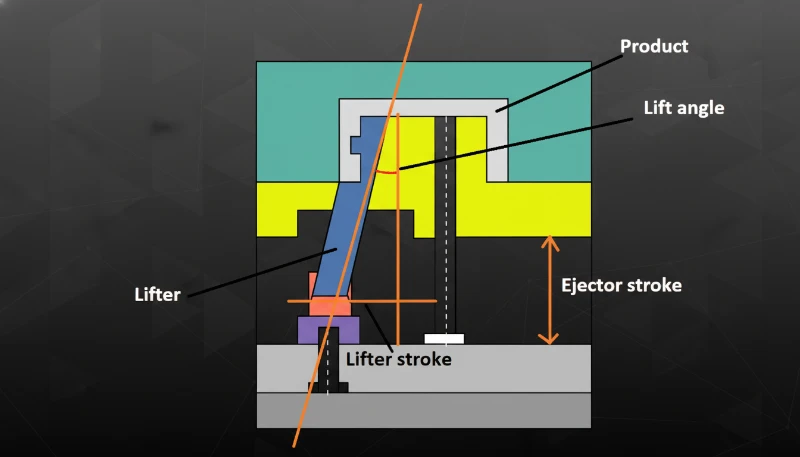
Injection mold lifter and ejector stroke diagram
リフターおよびエジェクター部品

「多キャビティ金型では、投影面積計算にラナー面積を含める必要があります。」

ランナーシステムは総投影面積の10~25%を占めます。これを省略するとトンネージを過小評価し、フラッシュや金型分離を引き起こします。

「中空円筒部品の投影面積から内径を差し引くべきです。」

クランプ力は部品の完全な円形シルエット(中空内部を含む)に作用します。キャビティ内圧力は壁断面だけでなく、投影面積全体に対して外側に押し出します。

How Does Projected Area Influence Machine Selection?

必要な成形機トンネージは投影面積に直接比例します。過小評価するとフラッシュ、ショートショット、寸法不良を生じます。

90Tから1850Tまでのマシンフリートを所有しているため、ほぼすべてのプロジェクトに適したプレス機を選定できます。以下は計算式に基づくマシン選定の方法です:

射出機を選定する際は、プラテンサイズも考慮してください。金型は射出機プラテン内に収まり、投影面積はプラテン総面積の約三分の二を超えないようにします。投影面積がプラテンの70%以上を占める場合、締め付け力分布が不均一になり、隅でのフラッシュ発生リスクが増加します。もう一つの要素はティーバー間隔です:ティーバーに対して幅が広すぎる金型は、トン数に関係なく取り付けできません。試作または生産を決定する前に、常に金型寸法と投影面積を射出機仕様書と照合してください。

総投影面積(cm2) 素材 必要トン数(トン) 推奨射出機範囲
< 100 PP/PE 15–35 90T
100–300 ABS/PA 40–120 120T–200T
300–800 PC/POM 120–350 200T–500T
800–2,000 PA/PC 350–800 500T–1000T
> 2,000 いろいろ 800+ 1000T–1850T
🏭 ZetarMold Factory Insight
Our in-house mold manufacturing facility supports 100+ mold sets per month, meaning we can quickly validate projected area calculations during the DFM phase and adjust mold designs before steel is ever cut — saving time and preventing costly surprises during production trials.
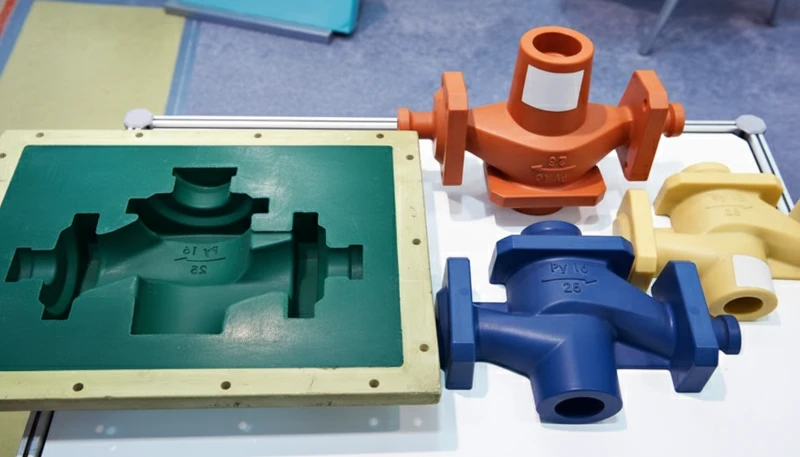
Prototype injection mold and parts display
Molded parts display

What Are the Common Mistakes in Projected Area Calculations?

The top mistakes are omitting runner area, skipping safety factors, measuring the wrong axis, and ignoring undercuts. We have corrected all of these in production.

Forgetting the Runner Area

This is the number one mistake. Engineers calculate the part area perfectly but forget that the runner system also contributes to the clamping force requirement. In multi-cavity molds, the runner area can add 10-25% to the total. Always include it.

Ignoring the Safety Factor

Running a machine at exactly 100% of its rated tonnage leaves no margin for process variation. Material viscosity changes, mold temperature fluctuations, and injection speed adjustments all affect the actual force. A 10-20% safety factor is not optional — it is essential.

Measuring the Wrong Dimension

For non-symmetric parts, the projected area changes depending on which direction the mold opens. A part might have a small projected area in one orientation and a large one in another. Always measure along the actual clamp direction of the intended mold design.

Not Accounting for Undercuts

Parts with undercuts or side features can have additional projected area that is not visible from the primary clamp direction. Side-action slides transmit force at angles, creating vector components that add to the total clamping requirement.

How to Use CAD Software to Calculate Projected Area?

The fastest way to get projected area is using CAD software. SolidWorks, Creo, and NX compute the silhouette along any axis in seconds.

“A safety factor of 10-20% above calculated tonnage is standard practice in injection molding.”

This margin accounts for material viscosity changes, mold temperature fluctuations, and normal machine wear. Running at 100% rated capacity leaves no room for process adjustments.

“Using a machine with twice the required tonnage always produces better quality parts.”

Oversized presses waste energy, increase cycle time due to larger platens, and can cause excessive compression on the mold, leading to premature wear on parting lines and ejector pins.

In SolidWorks, use the Measure tool with the projected area option, selecting the plane perpendicular to the clamp direction. In Creo (Pro/E), use the Analysis → Measure → Area tool with projection enabled. In Siemens NX, the Measure Faces command includes a projection direction option.

These tools give you the precise projected area in seconds, including complex organic shapes, fillets, and draft angles. We always cross-check CAD results with manual calculations for critical applications — it takes 30 extra seconds and catches potential errors.

What Is the Relationship Between Projected Area and Part Quality?

The projected area does not just affect machine selection — it has a direct impact on part quality and dimensional tolerance. Underestimating the projected area (and consequently the required tonnage) leads to several quality issues.

Flash is the most obvious symptom. When clamping force is insufficient, the mold separates at the parting line by even a few hundredths of a millimeter, and molten plastic escapes. Beyond flash, insufficient tonnage can cause dimensional instability — the part thickness varies because the mold is flexing under injection pressure. In severe cases, it leads to part weight variation and sink marks.

Conversely, grossly overestimating the projected area and using an oversized press wastes energy, increases cycle time (larger platens take longer to open and close), and can cause excessive compression on the mold, leading to premature wear on parting lines, ejector pins, and out-of-tolerance dimensions.

The sweet spot is 80-90% of the machine’s rated tonnage. This gives you adequate clamping force with some headroom for process adjustment while avoiding the inefficiencies of an oversized press.

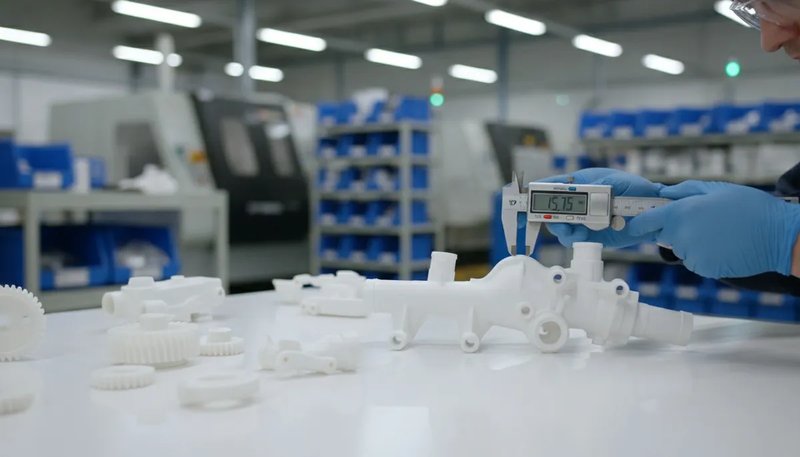
射出成形部品の寸法精度に関する品質検査
Quality testing ensures parts meet tolerance

How to Optimize Part Design to Reduce Projected Area?

Sometimes the projected area is too large for the available machine. Before investing in a larger press, consider these design optimizations to reduce the projected area.

Redesign the parting line. Moving the parting line can change which features are projected along the clamp axis. A part oriented at a different angle in the mold may have a significantly smaller projected area.

Reduce the number of cavities. If a four-cavity mold requires too much tonnage, a two-cavity mold halves the part-related projected area. You sacrifice throughput, but it may be more economical than buying a larger machine.

Switch to a hot runner system. Eliminating cold runners removes their contribution to the projected area. In tight-margin calculations, this alone can make the difference between fitting on a 500T press versus needing a 650T machine.

Consider insert molding or overmolding. These techniques can reduce the size of each individual shot while still producing a complex finished part through multiple operations on smaller machines. Insert molding also lets you combine metal inserts with plastic features in a single operation, eliminating secondary assembly steps and reducing overall production costs while keeping the projected area manageable for standard tonnage machines.

Another effective strategy is to modify the gate location. Moving the gate closer to the center of the part can reduce the flow length, which in turn reduces the required injection pressure and clamping force. Symmetrical gate placement also distributes pressure more evenly across the cavity, further minimizing the risk of flash and ensuring consistent part quality across the entire projected area.

🏭 ZetarMold Factory Insight
With 20+ years of experience across 400+ plastic materials, our engineering team routinely helps customers optimize part designs and mold layouts to minimize projected area — often reducing required machine tonnage by 20-30% without sacrificing part quality.
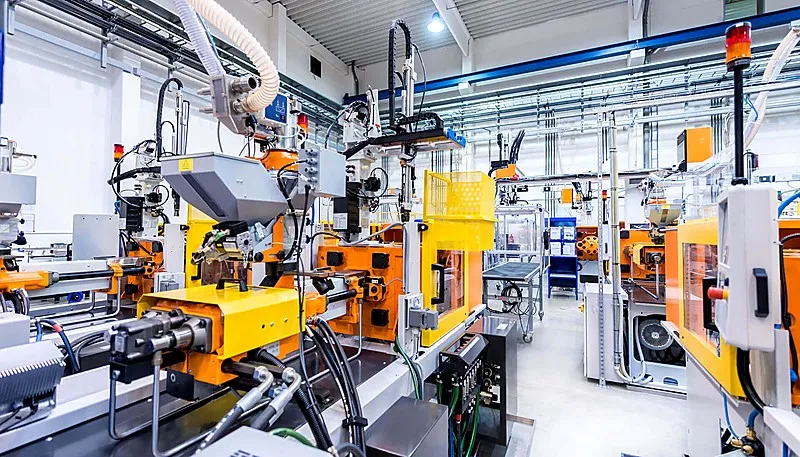
Injection Molding Factory Show
ZetarMold factory floor — 20+ years

What Are the Most Common Questions About Projected Area in Injection Molding?

よくある質問

What is the projected area in injection molding?

The projected area in injection molding is the two-dimensional silhouette of a part when viewed along the clamp direction. It represents the maximum cross-sectional area that the molten plastic pushes against during the injection process, and it directly determines the clamping force required to keep the mold closed during filling and packing. Engineers calculate it by measuring the outline of the part from the mold closing direction and converting the result to square centimeters or square inches. This measurement is essential for proper machine selection.

How do you calculate clamping force from projected area?

Clamping force equals the total projected area — including both the part cavity and the runner system — multiplied by the cavity pressure of the material being molded, divided by 1,000 to convert from kilograms-force to metric tons. For example, a part with 150 cm² of projected area molded in ABS at 400 kgf/cm² requires (150 × 400) ÷ 1,000 = 60 tons of clamping force. Engineers always add a safety factor of 10 to 20 percent to account for viscosity changes, temperature fluctuations, and normal process variation during production runs.

Does runner area affect projected area calculation?

Yes, the runner system absolutely affects the total projected area and must be included in every tonnage calculation. The clamping force must resist the injection pressure acting on both the cavity and the runner channels. In multi-cavity molds, the runner area can add 10 to 25 percent to the total projected area. For critical production applications, engineers must include the full runner layout in the calculation to avoid underestimating tonnage, which would cause flash and dimensional defects on the production floor.

What happens if the machine tonnage is too low for the projected area?

When the machine tonnage is insufficient for the projected area, the mold separates slightly at the parting line during the high-pressure injection phase. This separation causes flash — thin fins of plastic that escape along the part edges and require secondary trimming or cause part rejection. In more severe cases, insufficient clamping leads to dimensional variation across the parting line, short shots where the mold does not fill completely, and inconsistent part weight from shot to shot. Selecting a machine with at least 10 to 20 percent more tonnage than calculated prevents these costly production issues.

How do you calculate projected area for complex shapes?

For complex shapes, decompose the geometry into simple forms — rectangles, circles, and triangles — then calculate each area separately using standard geometric formulas. Sum all sub-areas while subtracting any overlapping regions to get the total. For organic or freeform surfaces, use CAD software with the projected area measurement tool, which computes the precise silhouette area along any specified direction in seconds. Most modern CAD packages such as SolidWorks, Creo, and NX include this functionality as a built-in measurement feature for injection mold designers.

What is the safety factor for injection molding tonnage?

The standard safety factor for injection molding tonnage is 1.1 to 1.2, meaning the selected machine should be rated 10 to 20 percent above the calculated clamping force. This margin accounts for material viscosity fluctuations between batches, mold temperature changes during extended production runs, injection speed adjustments during process optimization, and normal hydraulic system wear over time. Operating a machine at exactly its rated capacity leaves no room for the process adjustments that are routinely needed to maintain consistent part quality throughout a production run.

Can projected area calculation reduce manufacturing costs?

Accurate projected area calculation reduces manufacturing costs primarily by preventing over-specification of machine size, which directly impacts hourly rates and energy consumption. Running a part on a 200-ton press instead of an unnecessary 350-ton machine saves energy, reduces the machine hour rate charged to the job, and often shortens cycle times because smaller platens open and close faster. Optimizing part orientation, runner design, or cavity layout to minimize projected area is one of the most cost-effective strategies available during the mold design phase.

投影面積は部品の表面積と同じですか?

いいえ、投影面積と表面積は根本的に異なる測定値です。表面積は三次元部品のすべての外面(あらゆる輪郭、リブ、ボスを含む)の総面積です。投影面積は、クランプ方向という特定の方向から見た二次元のシルエットに過ぎません。表面積が1,256 cm²の球体は、どの角度から見ても投影面積は約400 cm²しかありません。射出成形に必要なクランプ力は、成形部品の総表面積ではなく、投影面積に依存します。

How Can You Master Projected Area Calculations for Better Injection Molding Results?

投影面積の計算は、適切な機械選定、金型設計、生産品質の基礎です。計算式はシンプルです:クランプ方向に沿ったシルエット面積を測定し、ランナー面積を加え、キャビティ圧力を掛け、1.1〜1.2の安全率を適用します。

シンプルなブラケットを設計している場合でも、複雑なマルチキャビティ 射出成形金型、この計算を正確に行うことで時間を節約し、欠陥を防止し、生産コストを管理下に保ちます。

ZetarMoldでは、当社のエンジニアリングチームが20年以上の実践経験をすべてのプロジェクトに活かしています。DFMレビューから生産最適化まで、投影面積を最初から正確に把握できるよう支援し、最初のショットから完璧な部品が得られるようにします。

射出成形プロジェクトでお困りですか? 当社のエンジニアリングチームからDFMフィードバック、正確なトンナージ計算、競争力のある価格を入手してください。


  1. projected area:投影面積とは、金型クランプ方向に沿って見たときの三次元部品の二次元シルエットを指し、通常は平方センチメートルまたは平方インチで測定されます。

  2. 射出成形:射出成形は、溶融材料を金型に射出して部品を製造する生産プロセスであり、プラスチック部品の大量生産に一般的に使用されます。

  3. フラッシュ:射出成形におけるフラッシュとは、射出中にパーティングラインに沿って金型キャビティから漏れ出た余分な材料を指し、部品表面に不要な薄いフィンを形成します。

最新の投稿
フェイスブック
ツイッター
LinkedIn
ピンタレスト
Mike Tangの写真
マイク・タン

Hi, I'm the author of this post, and I have been in this field for more than 20 years. and I have been responsible for handling on-site production issues, product design optimization, mold design and project preliminary price evaluation. If you want to custom plastic mold and plastic molding related products, feel free to ask me any questions.

私とつながる

クイック見積もり

図面および詳細要件を下記までお送りください。 

Emial:[email protected]

または下記のお問い合わせフォームにご記入ください:

クイック見積もり

図面および詳細要件を下記までお送りください。 

Emial:[email protected]

または下記のお問い合わせフォームにご記入ください:

クイック見積もり

図面および詳細要件を下記までお送りください。 

Emial:[email protected]

または下記のお問い合わせフォームにご記入ください:

クイック見積もり

図面および詳細要件を下記までお送りください。 

Emial:[email protected]

または下記のお問い合わせフォームにご記入ください:

クイック見積もり

図面および詳細要件を下記までお送りください。 

Emial:[email protected]

または下記のお問い合わせフォームにご記入ください:

ブランドのクイック見積もり

図面および詳細要件を下記までお送りください。 

Emial:[email protected]

または下記のお問い合わせフォームにご記入ください:

Спроситебыструюцитату。

Мы свяжемся с вами в течение одного рабочего дня, обратите внимание на письмо с суффиксом "[email protected]".

クイック見積もり

図面および詳細要件を下記までお送りください。 

Emial:[email protected]

または下記のお問い合わせフォームにご記入ください:

クイック見積もり

図面および詳細要件を下記までお送りください。 

Emial:[email protected]

または下記のお問い合わせフォームにご記入ください: